From Solo Tool to Team System: Scaling Claude Code on a Large Codebase
In this article
Introduction
Most AI coding tools generate code that works in isolation but ignores your team's architecture, conventions, and patterns. The review bottleneck gets worse, not better — AI produces code faster, but someone still has to catch every convention it missed.
I lead a mobile team of six developers on a Flutter monorepo with 78 packages, roughly 500K lines of code, built on layered architecture with strict standards. When I started using Claude Code, it worked well for individual tasks — but the output rarely matched what a senior developer on the team would write. Getting it to work reliably for an entire team required building something more deliberate: a system where the AI already knows the team's rules before it writes a single line.
The result changed how we work. Bug investigations that took hours now produce structured reports in minutes. Code reviews catch architecture violations before a human reviewer opens the diff. Developers who'd never touched a module get the same context a domain expert would provide. And the team didn't just adopt the system — they started contributing to it, improving skills and building agents for their own domains.
This article covers both the why (encoding team expertise so AI follows the same standards humans do) and the how (the orchestration of Claude Code's tools — skills, agents, rules, hooks, commands — and when to use each). For the basics of these features, the official Claude Code documentation is the right starting point. This article is about applying them at scale.
Table of Contents
- Introduction
- From Vibe Coding to AI-Augmented Development
- The Pieces and How They Fit Together
- Workflows That Had the Biggest Impact
- Integrating with Corporate Tools
- Team Adoption
- The Cost Question
- Takeaways
- What's Next
From Vibe Coding to AI-Augmented Development
This distinction matters. Vibe coding is prompting an AI to build something and accepting whatever comes out. It works for prototypes, side projects, exploring ideas. There's nothing wrong with it — for those contexts.
But on a production codebase maintained by a team, the output needs to meet the same standards a senior developer would follow: correct architecture layers, the right design system components, proper state management patterns, consistent commit messages. If you let the AI freestyle, you'll spend more time reviewing and fixing than you saved.
What we built is a system where Claude Code already knows the team's rules before it writes a single line. It's not hoping for the best — it's working within the same guardrails every developer on the team follows. The difference between vibe coding and AI-augmented development is the presence of encoded standards.
The Pieces and How They Fit Together
Claude Code offers several extension points. The value isn't in any single one — it's in how they compose into a system. Here's how we use each, and when.

Skills: What the Team Knows
Skills are guidelines loaded into context when relevant. They encode how to write code: architecture rules, design system conventions, coding standards, review criteria.
The key property of skills is that they auto-activate. You don't need to remember to load them — they trigger based on what you're working on. When a developer touches a UI component, the design system skill loads automatically. When they work on a repository layer, the architecture skill appears. This means a developer who has never used the system before still gets the right context without knowing the skill catalog.
We use skills for anything that's a repeatable standard: layer separation rules, component usage guidelines, commit message format, state management patterns. If the team has a convention, it's a skill.
TIP
When to use a skill: When you have a pattern or convention that should be applied consistently across tasks and developers. Skills answer "how should this be done."
Rules: Lightweight, Path-Scoped Conventions
The .claude/rules/ folder complements skills with modular, always-on instructions — small markdown files scoped to specific parts of the codebase. Each rule can include a paths frontmatter field with glob patterns (e.g., src/api/**/*.ts), so it loads into context only when Claude touches matching files. Rules without a paths field load unconditionally, like CLAUDE.md.
Where skills are richer documents designed for workflows, rules are short guardrails: "always use design tokens, never hardcode colors," "all user-facing strings must use the i18n hook." They keep the context lean — Claude only sees the rules relevant to the files it's working on — and they're simple enough that any developer can add one in a minute.
TIP
When to use a rule vs. a skill: Rules are for short, scoped conventions — a few lines that apply to a specific area of the codebase. Skills are for richer, cross-cutting knowledge — architecture patterns, review criteria, multi-step workflows. If it fits in a paragraph and maps to a file path, it's a rule.
Agents: Who Does What
Agents are specialized sub-processes that handle autonomous tasks. Each agent has a defined role, a set of constraints, and knows which skills to reference for its domain.
The distinction from skills is important: skills are passive context ("here are the rules"), agents are active executors ("do this task following those rules"). An agent for bug investigation knows the process: parse the ticket, form hypotheses, search the codebase, propose a fix. An agent for code review knows what to check: architecture compliance, design system usage, common anti-patterns.
We assign different model tiers based on task complexity. Implementation agents run on the most capable model. Review and analysis agents use a mid-tier model. Triage and cleanup agents use the fastest, cheapest model. The mapping isn't perfect — some tasks that seem simple need more reasoning power — but it provides a sensible default.
TIP
When to use an agent: When you're delegating a specific, well-scoped task that produces structured output. Agents answer "what needs to be done."
Hooks: Automatic Triggers
Hooks run automatically in response to events — before a prompt is processed, after a tool is called, before context is compacted. They're the automation layer.
We use three hooks. One suggests relevant skills and agents when you type a prompt — it reads the input, matches against a rules file, and shows what's available. In practice, this helps new users discover capabilities without memorizing the skill catalog — they see what's relevant as they work. Another hook blocks edits to files containing secrets. A third reminds you to save your working state before the session context is compacted.
TIP
When to use a hook: For automated checks or suggestions that should happen every time, without human intervention. Hooks answer "what should happen automatically." Use them sparingly — only for security concerns (blocking) or lightweight suggestions (non-blocking). Overusing hooks makes the system noisy.
Commands: Shortcuts to Workflows
Commands are one-line shortcuts that trigger multi-step processes. They're the entry point for common workflows: analyze a package, investigate a bug, review code, plan a feature.
A command typically loads the right skills, launches the right agent, and passes the right context. Instead of remembering "load the architecture skill, then launch the review agent on this MR," you type /review and the system handles the orchestration.
Commands are the simplest piece — if your team runs a workflow frequently enough that the steps should be automated, make it a command.
Continuity Across Sessions
Long sessions degrade in quality as the context window fills. Complex features spanning multiple days require multiple sessions, and each new session starts from zero.
We solved this with a 3-file structure: an implementation plan broken into phases, a context file tracking key decisions and current state, and a task checklist with progress. At the end of each phase, you update the docs and commit. When you start a new session, Claude reads the three files and picks up where it left off.
TIP
When to use plan & state: For any task that takes more than one session. For small tasks, it's overkill. For a multi-package refactor spanning a week, it's essential.
The Orchestration
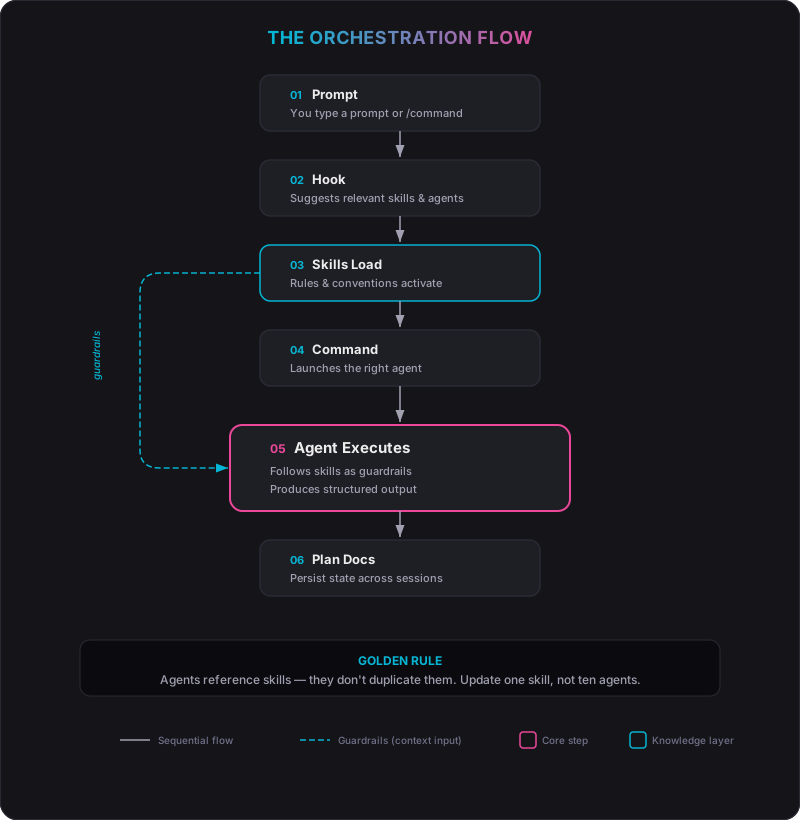
Here's how the pieces work together on a real task:
- You type a prompt or command
- A hook suggests relevant skills and agents based on your input
- Skills load automatically, providing the rules and conventions as context
- A command launches the appropriate agent for the task
- The agent executes following the loaded skills as guardrails
- Plan & state files persist progress if the work spans multiple sessions
IMPORTANT
The golden rule: agents reference skills, they don't duplicate them. Skills encode knowledge once; agents, commands, and hooks all draw from the same source. When a standard changes, you update one skill — not ten agents.
Workflows That Had the Biggest Impact
Bug Investigation
When a production bug comes in — from the tracker, from support, from QA — a senior developer follows a process: understand the issue, form hypotheses, search the codebase for evidence, confirm the root cause, propose a fix. Everyone does this. Most of the time, mentally.
We encoded that exact process into a command and an agent. You type the command with a ticket ID, and the agent:

- Understands — parses the ticket (reproduction steps, expected vs. actual result, affected module)
- Hypothesizes — generates 2-4 ranked theories based on the symptoms
- Investigates — searches the codebase, traces the architecture layers, checks git history
- Proposes — presents root cause with evidence and a fix proposal
The agent proceeds automatically when the information is clear and stops only when it genuinely needs input. If the first hypothesis is wrong, it moves to the next. After two rejections, it escalates and asks for guidance. The investigation report is saved for future reference.
The value isn't that the AI is smarter than a senior developer. It's that the process is always followed — no steps skipped, no shortcuts, structured output every time. A developer picking up a ticket in an unfamiliar module gets the same structured walkthrough: relevant files, architecture layers involved, ranked hypotheses, evidence from git history.
Code Review
Review is triggered with a command — either on a merge request or on local files. The review agent checks architecture compliance, design system usage, state management patterns, and common anti-patterns. It loads the relevant skills as its review criteria.
This handles the mechanical part — the checklist items that every reviewer checks but that eat time. The human reviewer focuses on design decisions, edge cases, whether the approach makes sense. Running the review on your own code before submitting became a natural habit on the team: fewer review rounds, less back-and-forth.
Integrating with Corporate Tools
A setup that lives in isolation isn't useful. Your team uses a project tracker, a git platform, a design tool, documentation wikis. Claude Code needs to plug into that ecosystem.
We integrated our project tracker (for ticket details and requirements), our git platform (for MR diffs and pipeline status), and our design tool (for UI context). Each integration serves a specific part of a workflow — bug investigation fetches ticket details, code review fetches MR diffs, UI implementation fetches design context.
The integration method matters more than you'd think.
MCP vs. CLI Scripts: The Hidden Cost
MCP (Model Context Protocol) is the standard way to connect external tools to AI coding assistants. Connect a server, and Claude can call its tools directly — project tracker, git platform, design tool, all available as tool calls. It's elegant and it works.
But it has a cost problem. Every connected MCP server adds its full tool schema to the context on every API call. Benchmarks show that CLI-based approaches are 10 to 32x cheaper on tokens than equivalent MCP calls. Five MCP servers with 20 tools each means roughly 80,000 tokens of schema definitions loaded before the conversation even starts. In multi-step workflows requiring several rounds of tool calls, total token consumption easily exceeds 50,000 tokens per session. Multiply that by a team running sessions daily, and the cost adds up fast.
The alternative is straightforward: CLI tools and bash scripts that call REST APIs directly. A script that fetches a ticket and returns structured JSON uses zero tool-definition tokens — Claude just reads the output. The model is already trained on millions of examples of shell commands and Unix pipes. It knows how to compose curl | jq or call a platform's CLI. No schema overhead, no token tax.
A Concrete Example: GitLab
Take GitLab — a platform many teams use for code hosting, MRs, and CI/CD. There are at least three ways to integrate it with Claude Code:
-
MCP server — GitLab provides an official MCP server. Connect it and Claude can browse MRs, read diffs, check pipelines. Convenient for exploration and one-off queries. But every call carries the full tool schema in context.
-
CLI (
glab) — GitLab's CLI lets you do the same things from the terminal:glab mr view,glab ci status,glab mr diff. Claude can call these directly in a bash command. No schema overhead. Faster, cheaper, composable with other CLI tools. -
CI/CD integration — Claude Code now has a GitLab CI/CD integration (currently in beta). This brings Claude into your pipeline: automated MR creation, code implementation from issues, project-aware assistance using your CLAUDE.md. The AI runs where your code already runs.
We started with MCP for everything — it was the fastest way to prototype. Then we measured the token cost and moved our daily workflows to CLI scripts. MCP stays connected for tools we use occasionally or that have no CLI equivalent. The CI/CD path is the next evolution: Claude as part of the pipeline, not just a tool you call from the terminal.
The Rule of Thumb
TIP
Use MCP for discovery, prototyping, and integrations without a CLI alternative. Move to scripts for anything that runs daily. Consider CI/CD integration for workflows that should be automated entirely. The choice isn't MCP or scripts — it's knowing when each one is the right tool.
Team Adoption
Building the system is one problem. Getting a team of senior developers to use it is different.
I didn't share the full system immediately. The first version I shared with the team was simpler — a few core skills and the most useful commands. I kept refining it over the following weeks, testing workflows, fixing what didn't work. Then the team started using it, and they started contributing: improving existing skills, proposing new workflows, building agents for their own domains. The system you'd see today is the result of that collective iteration, not just my initial design.
From Users to Contributors
The shift that mattered most was when the team went from using the system to improving it. People started refining existing skills — better edge case handling, fewer false positives in architecture checks. Then they proposed new workflows. Then they built new agents for their specific domains.
A system maintained by one person reflects one person's workflow. A system maintained by the team reflects the team's collective expertise. Skills and agents are versioned in the repo like any other code — they go through review, they get iterated on, they improve over time.
The Skill-Activator as Discovery
The hook that suggests skills and agents when you type a prompt turned out to be a useful onboarding tool. When a developer is working on a UI component and sees a suggestion to load the design system skill, they don't need to know the skill catalog in advance. The system surfaces what's relevant. It lowers the barrier to discovering capabilities you didn't know existed.
The Cost Question
Let's be direct: for us, at current pricing, AI-augmented development is a great deal. A team of six running agentic workflows daily — the value clearly exceeds the cost. The productivity gain on bug investigation, code review, and feature planning alone justifies it.
But there's a broader question. AI providers are burning more money than they're earning on these plans. The current pricing — especially unlimited or high-tier subscriptions — is subsidized. It's not clear how long that lasts. When the economics correct, teams that built their entire workflow around cheap unlimited tokens will need to adapt.
This is why we're already thinking about cost-aware orchestration. Model selection matters: not every task needs the most capable (and expensive) model. Triage and cleanup tasks run on the fastest, cheapest model. Only implementation and planning tasks use the top tier. Being deliberate about which model runs which agent isn't just optimization — it's future-proofing.
We're also watching the alternatives. Gemini CLI offers a different cost structure for certain workflows. Self-hosted open models like Qwen 3 (480B parameters) are becoming capable enough for mechanical tasks — linting fixes, code formatting, simple refactors — at a fraction of the cost. The future likely isn't one model for everything, but multi-model orchestration: the right model for the right task, with cost as a first-class routing criterion.
The Claude Code tooling (skills, agents, hooks, commands) is well-designed for this. The system we built — where agents have defined roles and scope — maps naturally to a multi-model setup. The orchestration layer doesn't care which model executes the task, as long as the skills and constraints are respected.
Token optimization is also practical. Moving from MCP to scripts for daily integrations reduced token usage significantly. Keeping skills focused and avoiding context bloat helps. Compacting sessions at the right time rather than letting them grow indefinitely makes each token count more.
But the fundamental question remains: can AI-augmented development at this level of sophistication become cost-effective enough for widespread team adoption? The technology works. The economics are still catching up.
Takeaways
Encode the process, not just the rules. Architecture rules are useful, but the real leverage is in encoding workflows — how the team investigates bugs, plans features, reviews code. These are the processes where consistency matters most.
Test before you share. Use the system yourself for weeks before involving the team. The first version of every skill and agent will need iteration. Work through the problems on your own time.
Let the team own it. The system stops being useful the moment it reflects only one person's perspective. Skills and agents are markdown files in the repo. Review them like code. Iterate on them like code.
Skills are living documentation. They're the most current description of how the team works. When a standard changes, the skill changes. This is documentation that stays maintained because it's used every day.
The orchestration matters more than any single piece. A skill alone is a style guide. An agent alone is a script. A hook alone is a trigger. Combined — with skills feeding agents, hooks activating skills, commands launching agents, plan & state persisting progress — they become a system that encodes how your team works. That's what scales.
What's Next
The system works. It's not finished.
The biggest open question is orchestration complexity. Right now, choosing the right combination of skills, agents, and commands for a task requires knowing the system. The skill-activator helps, but it's a suggestion layer, not an orchestrator. A more mature version would handle multi-step workflows as a single composed pipeline.
We're also looking at expanding our use of rules — the .claude/rules/ folder with path-scoped conventions. A rule like "always use design tokens from the theme, never hardcode hex colors" scoped to src/ui/**/* means Claude only loads it when touching UI files, keeping context lean everywhere else. We use a few rules today, but the potential is wider: scoping API conventions to the network layer, test patterns to test directories, platform-specific guidelines to dedicated modules. Rules won't replace skills, but they can handle the short, file-scoped guardrails that don't need a full skill document.
Another direction is sharing across teams. Right now, skills and agents live in our mobile repo. But the frontend team, the backend team, and the mobile team all use the same project tracker, the same git platform, similar review workflows. A bug investigation agent or a commit standards skill doesn't need to be rewritten three times. The transferable parts — ticket parsing, review structure, planning workflows — could be shared across teams, with each team adding their stack-specific skills on top.
And there's a broader pattern:
IMPORTANT
If the team repeats it, write it down. If you write it down, make it machine-readable. If it's machine-readable, an AI can follow it.
That principle extends beyond the development team — to CI/CD, incident response, onboarding, and even product team workflows like spec writing, ticket refinement, and release planning. Any process with repeatable structure is a candidate. We haven't gone there yet, but the direction is clear.